CRM Business Software Solutions Compared: Find the Right Fit for Your Company
In today’s competitive business landscape, selecting the right business software solutions can make or break your company’s success. Customer Relationship Management (CRM) systems have become essential tools for businesses of all sizes, helping teams manage customer interactions, streamline sales processes, and improve overall productivity. With numerous options available in the market, choosing the perfect CRM solution can feel overwhelming.
This comprehensive guide compares the top CRM business software solutions to help you make an informed decision that aligns with your company’s unique needs and budget.
What Are CRM Business Software Solutions?
CRM business software solutions are technological platforms designed to manage and analyze customer interactions throughout the customer lifecycle. These tools help businesses of all sizes track leads, manage customer data, automate sales processes, and enhance customer service quality. Modern CRM systems go beyond simple contact management, offering advanced features like marketing automation, analytics, and integration capabilities with other business tools.
Core Functions of CRM Systems
Understanding the fundamental capabilities of CRM business software solutions will help you evaluate different options effectively. The primary functions include contact management, where all customer information is stored and organized; sales tracking, which monitors pipeline progress and deal stages; and communication tools that enable seamless interaction with clients through various channels. Additionally, reporting and analytics features provide valuable insights into customer behavior and business performance.
Top CRM Business Software Solutions Compared
Let’s examine the leading CRM platforms available in the United States market, analyzing their features, pricing, and ideal use cases.
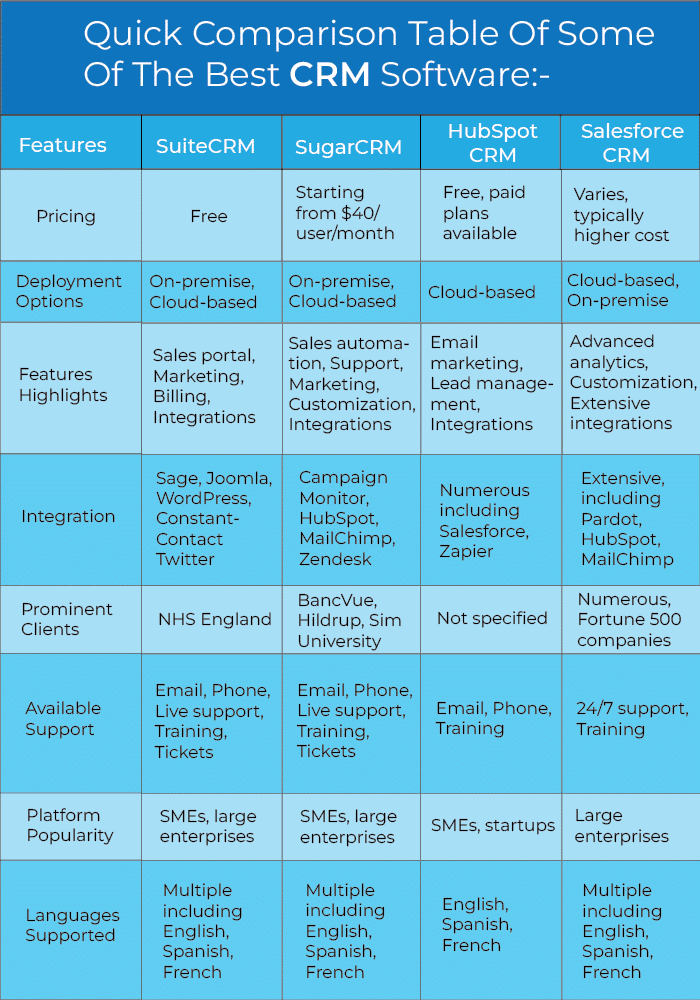
Comparison Table: Leading CRM Platforms
| CRM Platform | Starting Price | Best For | Key Strength |
|---|---|---|---|
| Salesforce | $25/user/month | Enterprise businesses | Advanced customization |
| HubSpot CRM | Free tier available | Small to medium businesses | Free tools and easy setup |
| Zoho CRM | $12/user/month | Budget-conscious teams | Affordable comprehensive features |
| Microsoft Dynamics 365 | $40/user/month | Microsoft ecosystem users | Seamless Office 365 integration |
| Pipedrive | $12/user/month | Sales-focused teams | Visual sales pipeline |
Detailed Analysis of Top CRM business software solutions
Salesforce: The Enterprise Powerhouse
Salesforce remains one of the most popular CRM business software solutions for large organizations. Its extensive customization options and robust ecosystem of apps make it suitable for complex business requirements. However, the learning curve can be steep, and costs can escalate quickly as you add users and features. Large enterprises with dedicated IT support often find Salesforce’s capabilities unmatched in the market.
HubSpot CRM: The User-Friendly Choice
HubSpot offers an exceptional free tier that has made it incredibly popular among startups and small businesses. Its intuitive interface requires minimal training, allowing teams to get started quickly. The platform’s inbound marketing focus combined with sales and service tools makes it a comprehensive solution. As your business grows, you can easily upgrade to paid tiers with advanced features like automation and custom reporting.
Zoho CRM: Budget-Friendly Excellence
Zoho CRM stands out among affordable business software solutions without compromising on features. It offers a complete suite of tools including marketing automation, analytics, and AI-powered assistance. The platform integrates seamlessly with other Zoho applications, making it ideal for businesses already using their ecosystem. Small to medium businesses appreciate the value proposition Zoho delivers at competitive price points.
Microsoft Dynamics 365: Integration Master
For organizations heavily invested in Microsoft products, Dynamics 365 provides unparalleled integration with Office 365, Teams, and other Microsoft tools. The platform offers robust enterprise features and AI capabilities that large organizations require. However, the higher price point and complexity make it most suitable for larger teams with dedicated administrators.
Pipedrive: Sales-Team Favorite
Pipedrive focuses specifically on sales pipeline management, making it perfect for sales-focused organizations. Its visual interface allows teams to track deals through each stage effortlessly. The platform’s simplicity means quick adoption across teams, and its automation features help sales representatives spend more time selling and less time on administrative tasks.
How to Choose the Right CRM for Your Business
Selecting the ideal CRM from available business software solutions requires careful consideration of several factors. First, assess your team size and growth projections to ensure the platform can scale with your needs. Consider your budget constraints, remembering that the cheapest option isn’t always the most cost-effective long-term. Evaluate the specific features your team needs most, whether that’s advanced reporting, marketing automation, or simple contact management.
Questions to Ask Before Deciding
What industries does the CRM serve best? How extensive is the customer support offered? Does the platform integrate with your existing tools like email, calendar, and accounting software? What training resources are available for your team? Taking time to answer these questions will prevent costly mistakes and ensure smooth implementation.
Implementation Best Practices
Successful CRM adoption requires more than just selecting business software solutions. Data migration planning should happen before implementation, ensuring all customer information transfers accurately. Invest time in proper training for all users, as even the most powerful CRM will underperform with poorly trained staff. Start with core features and gradually expand usage as your team becomes comfortable with the platform.
Common CRM Mistakes to Avoid
Many businesses fail to maximize their CRM investment by making predictable mistakes. Avoiding data entry inconsistencies from the start will save countless hours of cleanup later. Don’t try to use every feature immediately; focus on what’s most valuable for your specific processes. Ensure executive sponsorship and involve key users in the selection process to drive adoption throughout the organization.
Frequently Asked Questions About CRM Business Software Solutions
What is the difference between cloud-based and on-premise CRM systems?
Cloud-based CRM business software solutions are hosted on the vendor’s servers and accessed through the internet, offering flexibility and automatic updates. On-premise solutions are installed locally on your company’s servers, providing greater control but requiring more IT resources for maintenance. Most modern businesses prefer cloud-based options for their scalability and accessibility.
How long does CRM implementation typically take?
Implementation timelines vary based on complexity. Basic CRM setup can take one to two weeks, while enterprise deployments with extensive customization may require several months. Factors affecting timeline include data migration volume, integration requirements, and team training needs.
Can small businesses benefit from CRM software?
Absolutely. Many CRM business software solutions offer free tiers or affordable plans specifically designed for small businesses. Even basic CRM functionality can significantly improve customer tracking, sales management, and overall organization for growing companies.
How much should a small business budget for CRM software?
Budgets vary widely based on needs. Free options like HubSpot’s basic tier work well for very small teams. Most small businesses can expect to pay between $12 and $25 per user monthly for quality CRM business software solutions with necessary features.
What integrations should I look for in a CRM system?
Essential integrations include email platforms like Gmail and Outlook, calendar applications, communication tools like Slack or Microsoft Teams, and accounting software. Consider your current business software ecosystem when evaluating CRM options to ensure seamless data flow between systems.
Future Trends in CRM Business Software Solutions
The CRM industry continues evolving rapidly with emerging technologies shaping future capabilities. Artificial intelligence integration is becoming standard, enabling predictive analytics and automated customer insights. Voice-activated interfaces and chatbots are changing how businesses interact with customers through their CRM platforms. Mobile-first design ensures sales teams can access critical information from anywhere, anytime.
The Rise of AI-Powered CRM Features
Modern business software solutions increasingly incorporate machine learning algorithms that analyze customer behavior patterns. These AI capabilities help predict customer needs, suggest optimal communication timing, and identify cross-selling opportunities. Companies investing in CRM platforms today should prioritize those demonstrating commitment to AI development and innovation.
Conclusion
Choosing the right CRM from available business software solutions requires balancing features, budget, ease of use, and scalability. Whether you choose Salesforce for its enterprise capabilities, HubSpot for its user-friendly approach, Zoho for its affordability, Microsoft Dynamics for ecosystem integration, or Pipedrive for sales focus, the right CRM will transform how your business manages customer relationships.
Remember that successful CRM implementation extends beyond software selection. Invest in proper training, maintain clean data practices, and continuously evaluate your usage to maximize your return on investment. The best business software solutions are those that your team actually uses consistently and effectively.
Your customers are the foundation of your business success, and managing those relationships professionally should be a top priority. Take time to evaluate your options, involve your team in the decision process, and choose a CRM that aligns with your current needs while supporting future growth.
Ready to find the perfect CRM for your business?
Next Steps
Evaluate your specific needs by creating a requirements document listing must-have features versus nice-to-have capabilities. Take advantage of free trials offered by CRM vendors to test user experience before committing. Consult with your IT team or external advisors to ensure technical compatibility with your existing infrastructure.
Read related articles on our blog for more insights into business software solutions and technology strategy. Contact our team of experts today for personalized recommendations tailored to your industry and business size. We’re here to help you navigate the complex world of CRM selection and implementation, ensuring you make the best decision for your organization’s success.
Take action now and transform your customer relationship management approach with the right business software solutions for your unique needs.
CTA: Read related articles and contact us for more information.